
The best DWG and PDF plan review handoff starts by keeping the source that still carries the context you need, then exporting a review result that the next person can read without guessing. Use the DWG when layouts, layers, or drawing structure matter; use the issued PDF when the sheet set is the working reference. In either case, the handoff should explain the issue, its location, and the action needed without silently replacing the authoritative file.
This is not a question of whether DWG or PDF is "better." It is a way to stop a review from losing its evidence somewhere between the first mark and the outgoing email, AirDrop, or project folder.

The short decision: which file should stay open during review?
Keep reviewing the DWG when the question depends on drawing context: the right layout, layer visibility, entity-level geometry, or the relationship between objects that a plotted sheet may not show. Keep reviewing the PDF when the issued multipage sheet set is the reference the recipient needs to recognize, especially when the review is tied to one page and its calibrated scale.
The shareable handoff is usually a third thing: a marked plan, exported PDF or image, or a structured notes report. It should communicate the review; it does not have to replace the original source.
| If the reviewer needs to… | Keep this source active | Share this result when appropriate |
|---|---|---|
| Check layouts, reduce layer noise, or inspect drawing context | The local DWG | A marked current view, full layout, or notes report |
| Review the issued sheet set, page by page | The local multipage PDF | A marked PDF page/set or notes report |
| Verify a PDF distance or area | The specific PDF page after calibration | A handoff that states the checked location and review context |
| Explain one field issue quickly | The source where the issue is easiest to recover | A focused marked plan or image |
| Give someone a list of observations to act on | The local source remains available for verification | A structured report with plan locations and selected evidence |
Autodesk describes DWG as the native format used by AutoCAD-based products and documents why version compatibility matters when drawings move between teams. Its DWG compatibility guidance is a useful reminder: do not casually swap out the source just because a downstream PDF is easier to send.
For a deeper file-choice discussion before the review begins, see DWG vs PDF on iPad for site review. This article begins at the next decision: how to finish a review without breaking the connection between source, observation, and output.
Why a PDF handoff should not automatically replace the DWG
PDF is excellent for distribution. Autodesk calls it an electronic document format that can be viewed across platforms and describes drawing-to-PDF output as the digital equivalent of a plotted sheet in its PDF export guidance. But an exported PDF can be a representation of a drawing rather than the whole drawing context. In particular, PDF export settings and visual styles can change which details travel downstream; Autodesk notes that some exported viewports become raster images and can lose layer information.
That does not make PDF a lesser input format. A supplied PDF plan can be the authoritative issued set, and it is often the right plan to review, annotate, and hand off. The operational rule is simpler:
Preserve the source that supports the review decision. Export a result that supports the recipient's next decision.
If your job is to inspect a DWG's layout or isolate layers before noting an issue, keep the DWG open. If your job is to work through the current drawing issue sheet by sheet, keep the PDF open. Do not treat a flattened output as a replacement for either source unless the project has explicitly made it one.
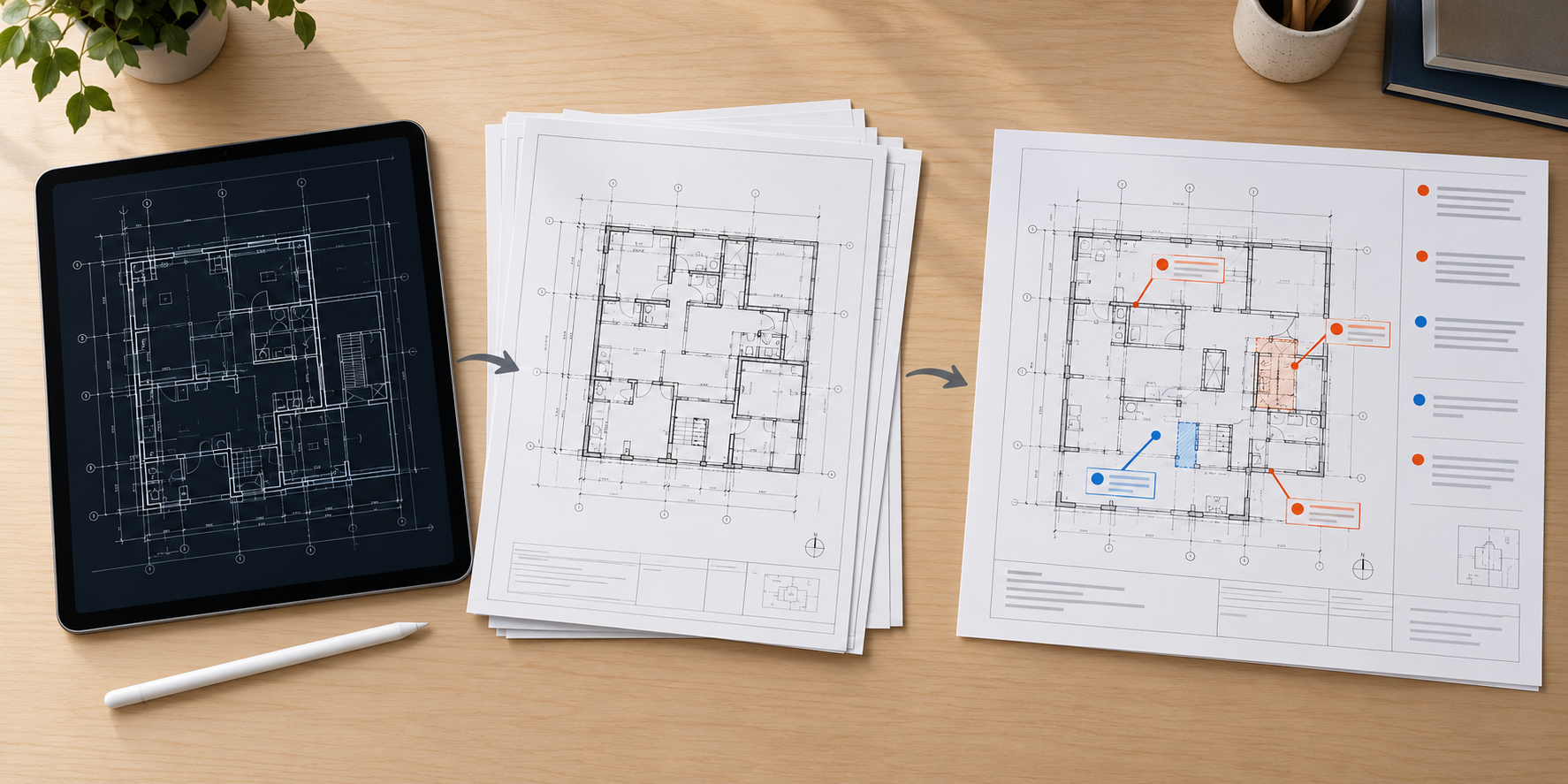
A seven-step DWG and PDF review handoff workflow
1. Identify the source and its role before making the first mark
Write down or confirm three facts: the file name or revision, the active layout or PDF page, and the purpose of the review. This takes less time than asking later which sheet the note came from.
For a DWG, check whether the decision depends on model space, a paper-space layout, or a layer that may be hidden in a printed view. For a PDF, confirm the page identity and whether it is the current issued sheet. If you will measure, remember that PDF scale is page-specific: calibrate the active page against a known dimension before relying on a measurement.
In PlanInspect, both local DWG and multipage PDF plans can be reviewed without a required account. DWG review can preserve layouts and layer context; PDF review can keep each page available for calibrated measurement, notes, markups, and export. That makes the source check part of the work instead of a separate file-management chore.
2. Decide what the recipient needs to understand
The recipient rarely needs every screen state from the review. They need an answer to a job question, such as:
- Where is the issue on the plan?
- What observation, photo, or measurement makes it credible?
- Is this a clarification, a decision request, or an action item?
- Does the recipient need the whole sheet, one viewport, or a structured list?
Answering this early prevents two common failures: a full-sheet export where a single detail would be clearer, and a cropped redline that removes the sheet context the recipient needs to orient themselves.
3. Make the observation recoverable on the source plan
Place the note or markup at the relevant plan location, use plain language, and retain only evidence that explains the point. A photo can help when it adds site condition; a measurement can help when the dimension changes the decision. Neither should become detached from the location that gives it meaning.
PlanInspect supports notes, photos, pen, highlighter, text, and markups on its local DWG and PDF workflows. It is a review layer, not CAD authoring: the goal is to communicate the observation clearly without claiming to alter the project's source geometry.
If you are building a broader field-report package, from plan annotation to a clear field report explains how source, location, evidence, action, and outgoing output fit together.
4. Choose the smallest output that still preserves the decision
There is no single best export. Choose the output that makes the handoff easy to act on:
- Focused marked view: useful for a single clarification where the exact area is the message.
- Full layout or page: useful when the issue needs surrounding sheet context, references, or orientation.
- Marked PDF set: useful when the recipient needs to move through the issued pages in the same order.
- Notes report: useful when several observations need a readable list, plan locations, and selected evidence.
For a DWG-first iPad workflow, how to export DWG markups as a PDF goes deeper on the distinction between a current view, a full layout, and a notes report. The same recipient-first decision applies when the active source is a PDF.
5. Make the outgoing artifact self-explanatory
Before exporting, look at the plan as if you did not attend the review. Can you identify the sheet? Can you find the issue? Does the annotation distinguish a confirmed observation from an open question? Is the key supporting evidence visible without hunting through a separate chat thread?
This is also where you should resist turning one review into a promise of a larger system. A marked plan or report is not automatically a revision set, a task-management workflow, or live collaboration. Keep its purpose narrow: help the recipient understand the review and verify it against the original source when needed.
6. Inspect the actual exported result before sharing
Open the final PDF, image, or report on the device you used to make it. Check the page, view framing, markup visibility, image attachments, and legibility at a normal zoom level. For a PDF measurement, state the source page and only rely on it if the page was calibrated from a known dimension; PlanInspect does not turn an uncalibrated PDF into a trustworthy scale measurement.
Then test the recipient path. Apple's Preview sharing guidance for Mac shows the familiar native choices—Mail, Messages, Notes, and AirDrop—for a PDF or image. Those are delivery paths, not proof that everyone now has the same source file or a synchronized review state.
7. Share the result and retain the source deliberately
Send the recipient-ready output through the channel your project uses, but retain the reviewed DWG or PDF where the team can verify it. If the work moves from iPad to Mac, make that a conscious handoff: transfer the selected files, reopen the source, and verify the reference before extending the review.
Capture a site walkthrough on iPad and finish the report on Mac shows that device roles can complement each other without pretending that a file transfer is automatic sync. For a broader Apple-device workflow, use the plan-review workflow across iPhone, iPad, and Mac.
What this looks like in PlanInspect
PlanInspect is most useful when the review needs more than a generic file viewer but less than full CAD editing. Start with the local plan the project relies on:
- open a DWG when layout, layer, and drawing context are part of the review;
- open a PDF when the multipage issued sheet set is the working reference;
- calibrate a PDF page before distance or area measurement;
- record notes, photos, and markups at the relevant location;
- export a visual handoff or a clearer notes report after the review is complete.
That sequence protects the real distinction between source and result. PlanInspect can help you review, measure, annotate, and export local DWG and PDF plans; it does not claim to edit CAD geometry, compare revisions automatically, read locked PDFs, perform OCR, or replace a project's collaboration system.

A five-point handoff check before you send
Use this quick check for either input format:
- Source: Can the recipient tell which DWG layout or PDF page the review references?
- Location: Does the markup point to an identifiable place on the plan?
- Evidence: Does each photo, note, or measurement clarify the issue rather than create more material to interpret?
- Output: Is the selected view, page, or report the smallest artifact that still communicates the decision?
- Verification: Did you reopen the exported file and confirm it is readable before sharing?
If any answer is no, return to the review while the source context is still open. It is almost always easier to correct an unclear note now than to reconstruct the intended location from an exported image later.
Common mistakes that weaken a plan review handoff
Sending only a screenshot
A screenshot can be fast, but it often loses page identity, scale context, and the route back to the source. Use it only when a focused visual clarification is enough, and accompany it with a clear plan reference when the recipient must verify the issue.
Treating a PDF as proof of all DWG context
A PDF can be the perfect issued review source. But when a question depends on DWG layouts, layers, or drawing structure, use the DWG during review and make the outgoing PDF a deliberately scoped result.
Measuring an uncalibrated PDF
Do not assume a title-block scale automatically makes every on-screen PDF measurement reliable. Confirm the active page and calibrate it from a known dimension. Scanned pages also do not provide vector geometry for snapping, so place points deliberately when a source lacks usable vector paths.
Calling a shared file a collaborative system
AirDrop, email, and cloud folders can move a completed artifact. They do not create live multi-user review, automatic version control, or automatic device sync. State what was sent, keep the source available, and make the next owner explicit.
FAQ
Should I send the DWG or PDF after plan review?
Send the file that the recipient needs for their next job, and retain the authoritative source. A PDF or report is usually easier for a recipient who needs to read the review; a DWG may also be required when they need drawing context such as layouts or layers. The important part is to name each file's role instead of assuming the outgoing PDF replaces the source.
Can I mark up a DWG or PDF without changing the source drawing?
Yes. In a review workflow, annotations communicate observations on top of the plan rather than alter CAD geometry. PlanInspect supports review notes and markups for local DWG and PDF plans; it is not a full CAD editing tool.
What should a construction-plan handoff include?
At minimum: a source reference, a recoverable plan location, a concise observation, only the evidence needed to explain it, and an exported result checked from the recipient's point of view. Add a report when multiple observations need a structured list.
Is a PDF good enough for a plan-review measurement?
It can be, when you confirm the correct page and calibrate it against a known dimension first. If the PDF is scanned, expect manual placement rather than vector-path snapping. Measurements should stay attached to the plan context that makes them meaningful.
Keep the source, share the decision
The most reliable DWG and PDF plan review handoff is not a forced choice between formats. Keep the file that carries the context the review needs, create the smallest readable output for the recipient, and inspect that output before it leaves your hands. That habit makes a field note, desk review, or cross-device workflow easier to verify long after the original conversation ends.